

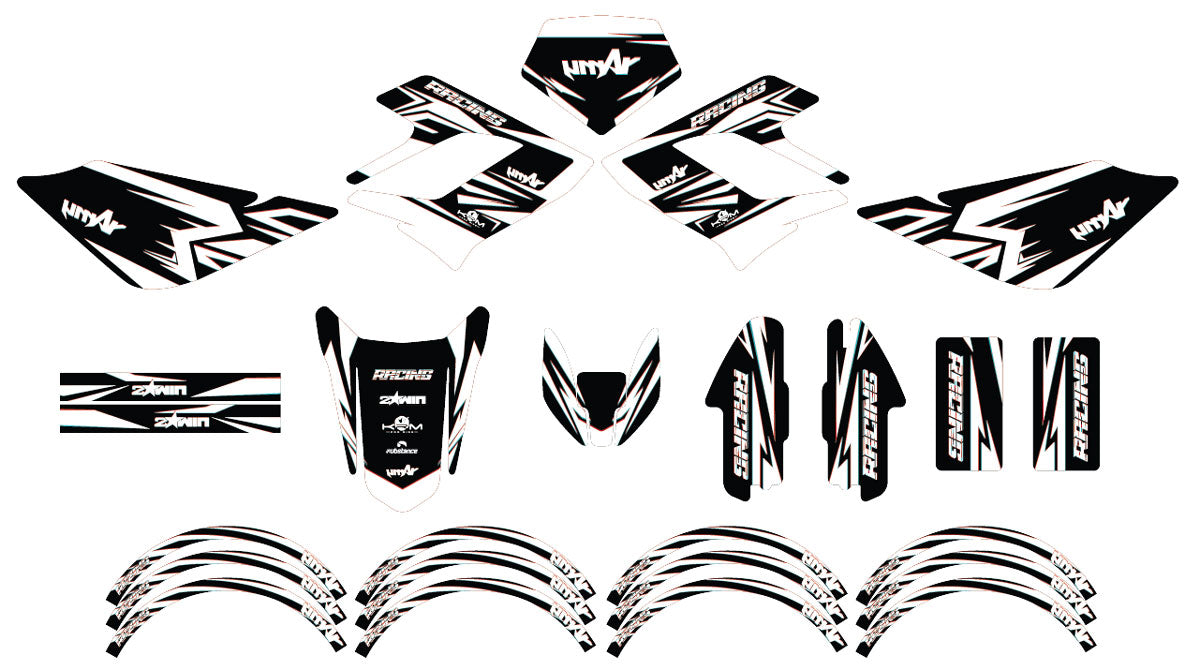


50cc Graphics kit Derbi DRD Racing Glitch
Design approved before printing | no surprises!
Pose facile, sans bulles
Maquette 24/48h
Modifications illimitées
Vinyle premium anti-UV


Product description
Graphics kit motorcycle 50cc Glitch – Compatible Derbi DRD Racing
Give a futuristic and striking look to your Derbi DRD Racing 50cc with the Graphics kit Glitch, an original creation by ArmySCTV. Inspired by digital effects and visual glitches, this deconstructed and bold design transforms your supermoto into a machine with a high-tech and unique style.
Made of ultra-resistant premium vinyl with anti-bubble adhesive, this kit offers easy application, perfect adhesion, and exceptional durability. The 8-color HD printing ensures sharp, precise, and vibrant graphics, resistant to UV, scratches, and weather.
Main features
- Exclusive “Glitch” design – inspired by the digital world and gaming culture.
- 8-color high definition printing for a bright and ultra-detailed finish.
- Premium finishes available: matte, glossy, holographic, chrome, glitter, textured, or fluorescent.
- Complete customization: add name, number, logos, or modify shades as you wish.
- Precise cutouts perfectly fitted to Derbi DRD Racing 50cc fairings.
Compatibility
This Graphics kit is designed exclusively for Derbi DRD Racing 50cc. In case of fairing or paint modifications, our team will adapt the template for free for a perfect fit and professional finish.
Why choose ArmySCTV?
- Specialist in 50cc & 125cc Graphics kits: Derbi, Beta, Rieju, Fantic, Sherco, Masai, Vent and more.
- Professional quality: premium vinyls, HD printing, and high-end finishes.
- Tailor-made service: direct contact with a graphic designer, unlimited revisions, and installation guide included.
Installation advice
Before application, clean and degrease your fairings carefully. The anti-bubble adhesive facilitates installation and allows precise positioning. Slightly heat the vinyl to perfectly fit the shapes. Each kit includes a complete installation guide for a professional and durable result.
With the Graphics kit Glitch for Derbi DRD Racing 50cc, give a modern and bold identity to your motorcycle. ArmySCTV guarantees you an original design, high-quality printing, and the best of the custom 50cc Graphics kit.
Printing Vinyl Specifications
| Vinyl Type | Technical Features |
|---|---|
| Glossy | Flexible white polymer vinyl with FLO® technology, allowing bubble-free application and printing with intense colors. |
| Holographic | Holographic polymer vinyl with FLO® technology, offering bubble-free application and enhanced opacity thanks to a light gray pigmented adhesive. |
| Chrome | Ultra-adhesive vinyl for difficult plastics, available in Silver Chrome and Holographic Chrome. FLO® technology eliminates bubbles and eases installation. |
| Fluorescent / Neon | Neon cast vinyl with FLO® technology, featuring an ultra-aggressive adhesive for optimal grip on all surfaces. |
Lamination Vinyl Specifications
| Vinyl Type | Technical Specifications |
|---|---|
| Glossy | Flexible transparent vinyl film with optically clear acrylic adhesive. Ensures optimal protection and a glossy finish. |
| Glitter | Transparent glitter vinyl film with holographic effect. Provides a unique shine and long-lasting print protection. |
| Textured | Textured vinyl film offering improved grip. Ideal for enhanced protection and better traction. |
| Matte | Matte vinyl film with anti-glare finish. Durable protection while maintaining a discreet and elegant look. |
Installation tips
Follow these 4 simple steps to install your holographic decal kit on your 50cc motorcycle decal kit and achieve a professional finish:
-
Surface Preparation:
Thoroughly clean the application area of your 50cc with a mild degreaser to remove dust, dirt, and oil traces. A clean surface is essential for your holographic decal kit to adhere properly.
-
Measuring and Marking:
Accurately measure the area to be decorated on your 50cc motorcycle decal kit. Use a non-permanent pencil to lightly mark the outlines to help align the vinyl during application.
-
Applying the Vinyl/Sticker:
Partially peel off the backing of the vinyl or sticker. Carefully position it on the marked area, then gradually remove the backing while smoothing the material with a squeegee or microfiber cloth to eliminate air bubbles and ensure perfect adhesion.
-
Finishing and Checking:
Check that the vinyl is firmly fixed over the entire surface of your 50cc motorcycle decal kit. Remove the protective film and make any necessary touch-ups to highlight the unique effect of your holographic decal kit.
When will I receive my order?
We will strive to send your order as quickly as possible. Once your order has been sent, you will receive an email containing further information. Delivery times vary depending on your location.
24/7 assistance by email
Our team is available to assist you before, during, and after your order.
We answer all your questions: customization, compatibility, installation, order tracking, or after-sales service.
📨 Contact email: contact@armysctv.com
⏱ Average response time: within 24 hours (excluding Sundays and public holidays)
🤝 Free advice: choice of finishes, colors, design, maintenance…
If technical assistance or adjustments are needed, we remain available until you have fully received your decoration kit.
We are also reachable via Instagram for any quick questions.
Fast & tracked delivery
🚚 Relay point or home delivery
📦 Production: 3–5 business days
📮 Delivery: 2–5 business days (4-6 days Europe)
🎁 Free delivery from €150 (France) and €200 (rest of the world)
🔎 Email tracking + support in case of issues
Satisfied or refunded
🔄 Return within 14 days
🛠 Free reshipment in case of error
🤝 Support after purchase
Our deadlines
We work custom-made to ensure a perfect finish for your motorcycle.
🖌 Mockup creation
24 hours to 4 business days depending on the complexity of the design.
✔️ Client approval
You receive the mockup by email.
Any requested modification may slightly adjust the deadline.
🖨 Production & printing
Once approved, manufacturing takes on average 3 to 5 business days.
📦 Shipping
Tracked delivery within 3 to 7 business days, depending on the destination.
⚡ Express Mockup Option
24-hour mockup option available at purchase
Technical information
🛡 Premium anti-UV vinyl
🎨 8-color HD printing
🔥 Protective lamination
✂️ Custom cutting
📏 Thickness 400–600 microns
👍 Easy bubble-free application
These technical features guarantee a durable decoration kit, easy to apply and designed to withstand both on-road and off-road conditions.


Derbi DRD Racing Graphics-kit (2004-2010): Excellence for an icon
Boost the style of your machine to new heights with our customization solutions for the Derbi DRD Racing 50cc. We have crafted templates with surgical precision specifically for the 2004-2010 generation, known for its sleek fairings and unique headlight plate. Whether you ride a SM (Supermotard) or R (Enduro) version, our kits fit every curve of your bodywork perfectly. By using high-performance vinyl, we ensure not only a "Factory" look but also a strong shield against road splashes, scratches, and yellowing caused by UV rays.
Top-Quality Finishes:
Holographic Vinyls, Chrome & Glossy

PRINTING
Holo / Chrome
Dynamic holographic reflections for a futuristic and personalized look.

FINISH
Glossy / Matte
Glossy enhances, matte offers a simple and elegant style.

IMPRESSION
Fluorescent / Neon
Ultra bright colors for a modern racing style and maximum visibility.

FINISH
Galactic Series
Cosmic glitter finish for a luxurious, deep, and exclusive look.

FINISH
Holo Spectrum
Multicolored holo effect with spectacular prismatic reflections.

FINISH
Ultracurve
Glossy surface with smooth gradients for a modern and high-quality style.
The journey of your Derbi project: A 100% tailor-made service
1. Graphic design and certified template
As soon as you place your order, our designers adapt the chosen visual to the exact pattern of your Derbi DRD Racing (2004-2010). We check the alignment of the logos on the radiator vents and the headlight plate to ensure perfect continuity of the designs. A high-definition digital proof (BAT) is sent to you by email.
2. Unlimited customization and approval (BAT)
You retain full control over your design. Colors, sponsors, social networks, or adding your race number: request as many adjustments as needed. We revise your project free of charge and without limit until you give your final "Good For Approval".
3. High-tech manufacturing and shipping
Your kit is printed on the selected material (Chrome, Holo, Fluorescent...) and protected by the chosen lamination. Thanks to our "Air Free" adhesive technology, fitting is simplified and guaranteed bubble-free. Each order is carefully cut, inspected, and shipped with reinforced protection.
Specific FAQ Derbi DRD Racing 2004-2010
Is the kit compatible with "Cross" type headlight covers?
The DRD Racing is famous for its specific headlight plate with double optics or round optics. If you have replaced your original plate with a model like KTM, YZ, or motocross plate, please let us know during customization. We will adjust the graphic design to your new setup at no extra cost.
Which finish should be chosen to accompany the silver perimeter frame?
To highlight the iconic metallic aspect of the DRD Racing, we strongly recommend the Chrome material or the Silver Glitter finish. If you are looking for a more understated but very high-quality style, the Frozen finish (frosted matte) offers a very modern satin look that pairs beautifully with the frame.
Does the kit include the fork guards?
Absolutely. Our complete kits for Derbi DRD Racing include the radiator vents, the headlight plate, the side plates, both mudguards, as well as the fork guards (essential on models equipped with inverted forks) and the swing arms.